
All case studies01 / 11

AI · Enterprise SaaS · 2026

TapClicks AI Agents

Keeping AI analysis inside the dashboard workflow.

RoleLead Product Designer (Sole Designer)StatusShippedContextTapClicks · Analytics & Reporting PlatformEvidenceAudit-led workflow redesign · Right-side panel · 4-state trust machine · Interruption logic trade-offs · Angular and Vue delivery
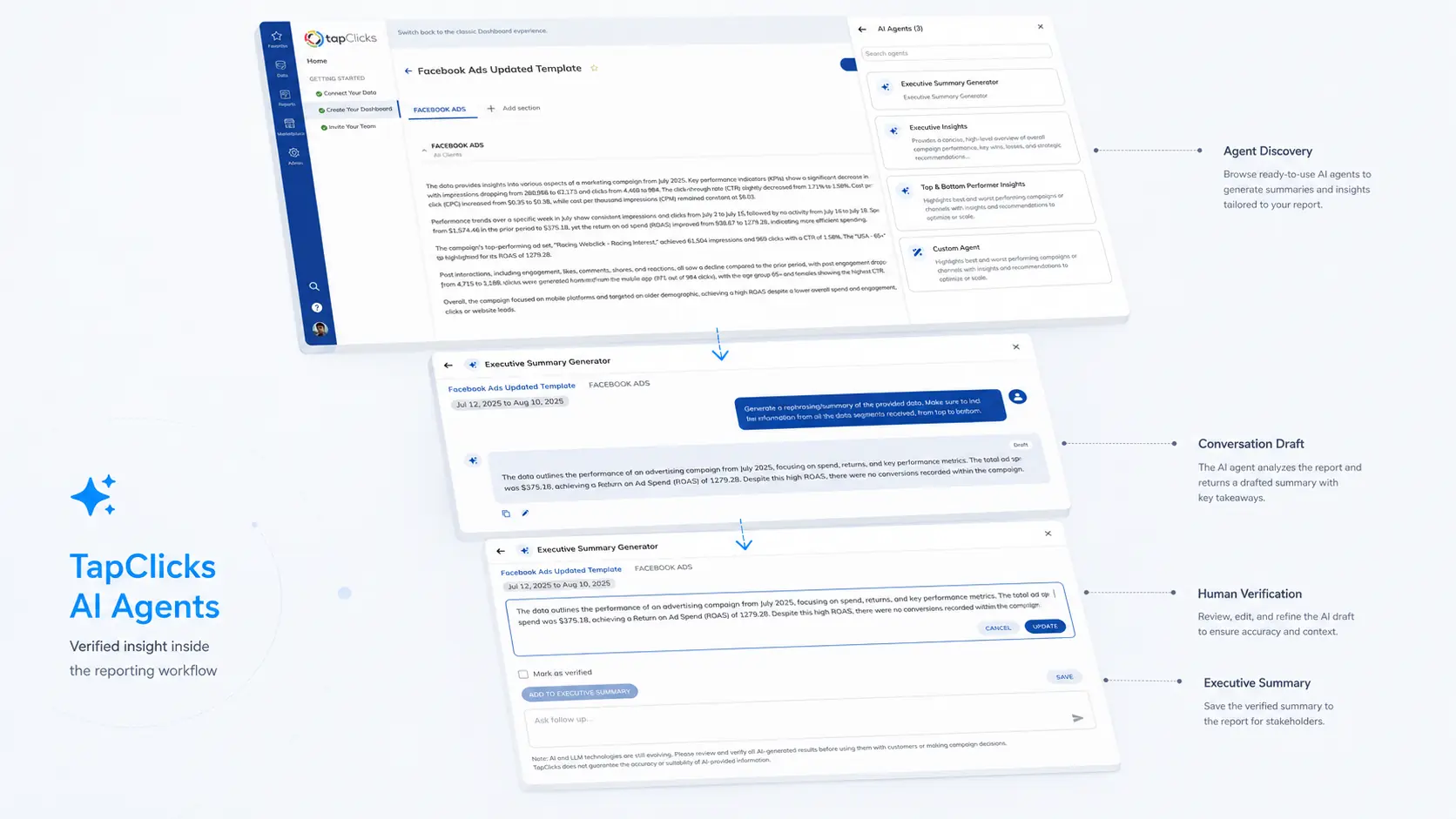
TapClicks AI Agents annotated exploded-view case study cover

Problem

What made this hard

In the baseline experience, starting analysis on a dashboard forced users to navigate away to a separate AI Executive Summary page, open a central modal to generate text, and manually return to the dashboard to paste it back. The multi-page context switching added heavy friction and broke analytical momentum.
Outcome

What changed

Redesigned the workflow around a persistent right-side panel that opens inside the active dashboard. Users can discover specialized agents, generate contextual insights, refine drafts inline, and enforce Human Verification without leaving their data. Standardized the interaction model across Angular and Vue reporting engines.

The thesis

An audit-led redesign of a fragmented analysis task, moving AI generation, inline editing, human verification, and summary handoff out of a disconnected modal flow into a persistent in-dashboard side panel.

Case-study proof

The decision record

Enough context to judge the choice, inspect the work, and separate evidence from ambition.

01

Why this, not that

I replaced a disconnected multi-page modal flow with an in-context right-side panel that keeps dashboard metrics visible. Instead of auto-publishing unreviewed text, I established an explicit Draft -> User Edit -> Human Verification Gate -> Executive Summary Handoff path to ensure human accountability.

02

Why this case is specific

Preserved live dashboard context and source date ranges while respecting enterprise role boundaries across both an established Angular reporting dashboard and a newer Vue dashboard platform.

03

What you can inspect

Shipped product workflow redesign + concept extensions

The case study presents the audit discovery, shipped agent discovery panel, editable draft states, human verification gates, and Executive Summary handoff. Widget and channel creation assistants are explicitly captioned as concept extensions.

04

Decision to outcome

Analysis stayed inside the dashboard context. Technical constraints around pending generation persistence were resolved through explicit Close confirmation dialogs and immediate Back navigation trade-offs.

Interface evidence

01 / Workflow Transformation · Audit-Led Redesign

From Multi-Page Modal Hops to In-Dashboard Side Panel

My usability audit revealed that generating an AI summary required navigating away to a separate page, opening a central modal, and copying text back. The redesign brought the entire workflow into a persistent panel inside the starting dashboard.

01 · BASELINE

Previous Modal Flow (4 Hops)

Disconnected Context

1. Select analysis action on main Dashboard

2. Navigate to separate AI Executive Summary page

3. Open central modal to generate response

4. Return to Dashboard to manually paste content

02 · SHIPPED

Shipped Panel Flow (1 Context)

In-Dashboard Continuity

1. Open right-side AI Panel inside active Dashboard

2. Discover agent, view metrics, and generate text

3. Refine draft inline & mark Human Verification

4. Add directly to Executive Summary without leaving

02 / Technical Constraints · Interruption Logic

Close vs. Back Behavior During Pending Generation

Because the backend did not support retaining in-progress responses after leaving, navigation actions during generation required explicit design rules to balance safety and switching speed.

ACTION 01

Close Panel Button

Confirmation Modal Dialog

Cancels pending generation if confirmed. Prevents accidental loss of unreviewed responses when exiting the workspace.

ACTION 02

Back Arrow Button

Immediate Return to Agent Catalog

Cancels pending generation without modal friction. Deliberately prioritizes agent-switching speed over prompt warnings.

03 / Governance · Human Verification State Machine

State Model: From Unreviewed Draft to Summary Handoff

Generated insights cannot auto-publish. Every item passes through explicit human editing and verification gates before handoff to client reports.

STATE 01

Unreviewed Output

Draft State

Generated response remains isolated inside side panel with raw model confidence and date range context.

STATE 02

Inline Refinement

User Edit

Analyst refines wording, adjusts numbers, and verifies source metrics inline inside the active conversation.

STATE 03

Human Verification Gate

Verification Stamp

Explicit verification check recorded. Establishes human review accountability before publishing.

STATE 04

Executive Summary Handoff

Report Publication

Verified insight is transferred directly into executive presentation slides or exported to client stakeholders.

01 / Audit & Discovery

Identifying unnecessary page hops in the baseline experience

Through a personal walkthrough and usability audit of TapClicks, I identified a fragmented analysis task. Generating a summary required leaving the dashboard, navigating to the AI Executive Summary page, opening a central modal, and manually copying content back. The redesign brought the entire workflow into a persistent panel on the starting dashboard.

02 / Workflow Redesign

Bringing generation and review into the dashboard context

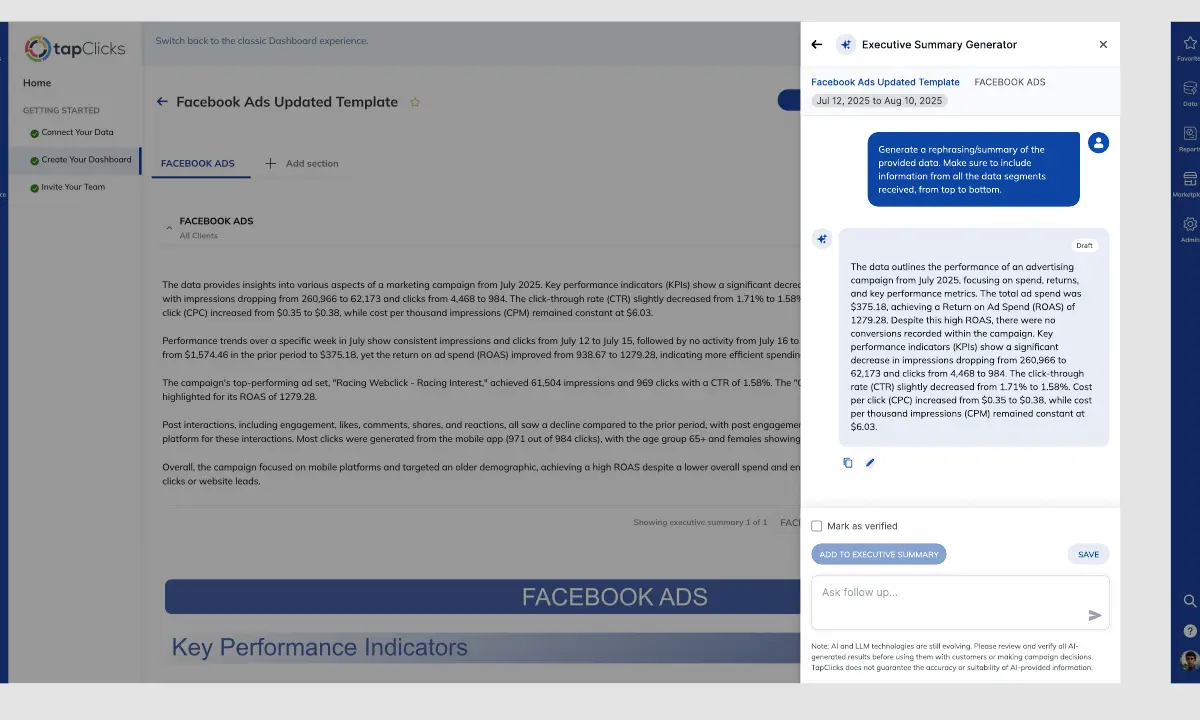
The shipped solution replaces the central modal with a right-side panel. Users select specialized AI agents, view generated insights, and inspect underlying dashboard metrics side-by-side without losing visual context or switching pages.

  • Searchable specialist agent catalog
  • Dashboard data remains visible underneath panel overlay
  • Inline draft editing without modal popups
  • Direct 'Add to Executive Summary' action inside the panel

03 / Interruption Logic

Managing pending generation under technical constraints

The existing backend could not retain an in-progress AI response after leaving the workspace. We designed selective confirmation rules during pending generation to balance safety and navigation speed.

  • Close Action: Displays a confirmation modal asking whether the user intends to quit, preventing accidental loss of pending responses
  • Back Action: Allows immediate return to the agent catalog to preserve quick switching flexibility without repeated prompt dialogs
  • Documented Trade-off: Back navigation cancels pending generation without confirmation—a deliberate trade-off prioritizing switching speed

04 / Trust Architecture

A response is a draft until a human verifies it

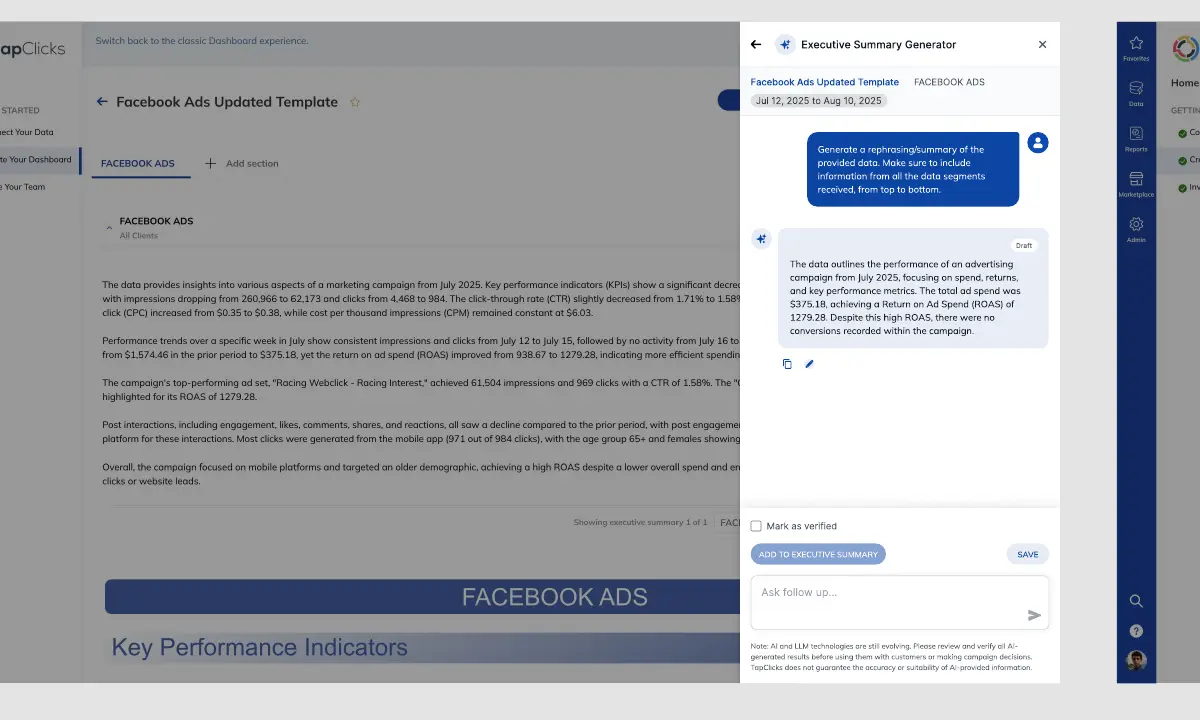
AI outputs cannot auto-publish to client reports. Every response passes through an explicit 4-stage Trust State Machine before handoff to an Executive Summary.

  • State 01 (Draft): Raw generated text with date range & metric context
  • State 02 (User Edit): Inline text refinement & numerical corrections
  • State 03 (Human Verification Gate): Explicit human verification check recorded
  • State 04 (Executive Summary Handoff): Verified insight inserted into executive slides or client report

05 / Cross-Framework Delivery

One interaction model across Angular and Vue platforms

The interaction model had to work seamlessly across the established Angular dashboard and the newer Vue dashboard. While entry points were tailored to each framework, the side panel layout, discovery cards, trust states, and verification rules remained unified.

06 / Concept Extensions

Extending conversational guidance to creation tasks

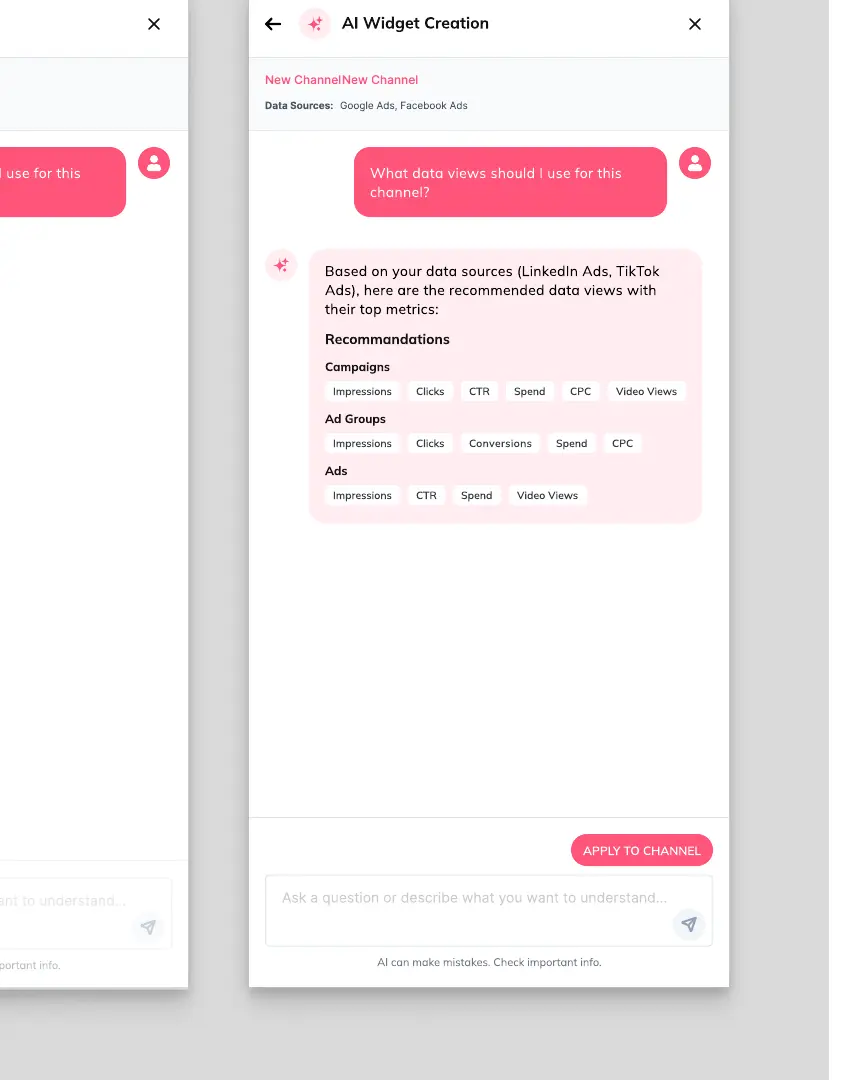
Beyond reporting summaries, I explored conversational guidance for widget setup and data channel configuration. These assistants recommend chart types, metrics, and field mappings while leaving final application control with the user. These screens are captioned as concept explorations.

07 / Reflection

Honest evaluation and future persistence opportunities

Looking back, the Close vs. Back trade-off could be further improved with a lightweight warning near the Back button. Long-term, retaining pending responses server-side remains the ideal technical evolution. Framing this case study around decisions and trade-offs demonstrates real product delivery rigor.

Supporting evidence

Exploratory Concepts · Non-Production Explorations

Concept Extensions: Widget & Channel Creation Assistants

Bring me the difficult part.

Complex workflows, AI trust, and enterprise systems.

Discuss a product challenge
About KowsikRésuméLinkedInEmail

Next case study

Read Global Filters case study